

V3 Pro Voice Remote Control Replacement for VSeeBox V5/ V3/ V2/ V1 Pro,V3 Plus,V1 Max/Elite Models
US$8.24
Price when purchased online
Free shipping
Free 30-day returns
Sold and shipped by www.binne.de
We aim to show you accurate product information. Manufacturers, suppliers and others provide what you see here.
US$8.24
Price when purchased online
Free shipping
Free 30-day returns
Sold and shipped by www.binne.de
Free 30-day returns Details
Product details
| Management number | 220140567 | Release Date | 2026/05/03 | List Price | US$8.24 | Model Number | 220140567 | ||
|---|---|---|---|---|---|---|---|---|---|
| Category | |||||||||
V3 Pro Voice Remote Control Replacement for VSeeBox V5/ V3/ V2/ V1 Pro,V3 Plus,V1 Max/ Elite Models
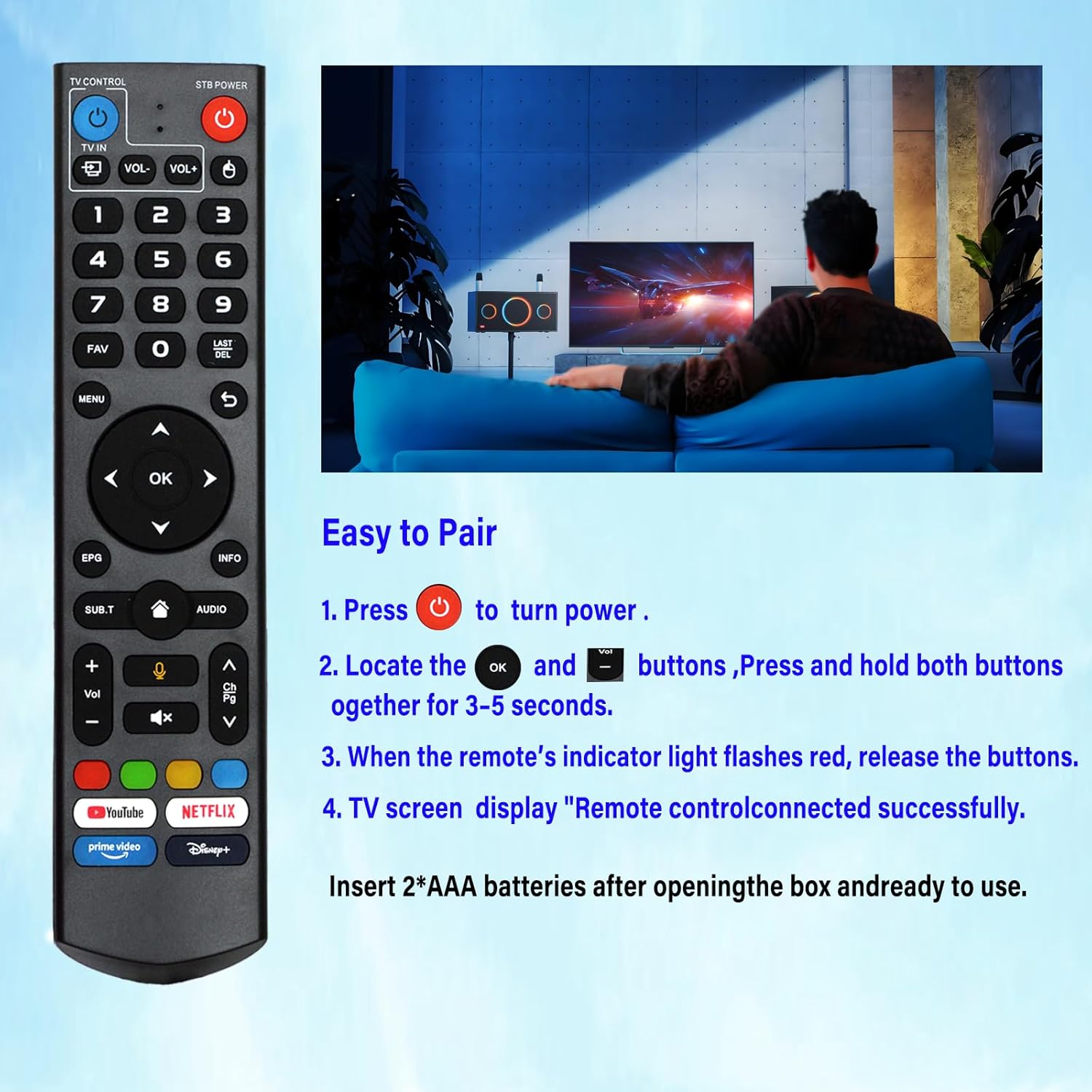
- ⚠️How to use the remote control :1.Press and hold [POWER] key for 5 seconds. the LED goss from blinking to solid and STB RCU enters Learning Mode. 2.Press the key to be programmed on this RCU. LED begins blinking slowly. The key is ready to accept programming. 3.Aim the TV RCU towards the front of this RCU(distance less than 5cm) Press the button on the TV RCU. If the STB RCU is programmed correctly, the LED will flash 3 times. 4.Repeat steps 2-3 for other keys and Exit learning mode by pressing any other button on this RCU. LED turns off
- (No voice command function) This is V3 Pro. It is applicable to the following models: vSeeBox V5 Pro/ V3 Plus/V3 Pro/ V2 Pro/V1 Pro/V1 Max/Elite/Max. V1 Max, V1 Pro, V2 Pro. Please ensure that the model of your box is on the above list
- The-enabled dual-function learning remote control with light is suitable for vSeeBox V3 - V5 Pro.There are two working modes: V3 working mode and V2 working mode. Press and hold the "5" number key for more than 10 seconds. The indicator light will flash, indicating that the mode switch has been successful. The V3 Pro working mode is applicable to V3 Pro; The V2 Pro working mode is applicable to V1 Pro/V2 Pro/Max/Elite. (Special Note: The Vseebox V3 remote control defaults to V3 working mode.)
- How should we use the V3 remote control on V1 Pro and V2 Pro/Max/Elite? Press and hold the OK key and the vol- key simultaneously (for about 5 seconds) until the indicator light on the remote control keeps flashing, indicating that the Bluetooth function of the V3 remote control is enabled. Under "System Settings - Bluetooth - Pair New Device", pair the remote control, find the vseebox remote control, and connect vseebox. If not found, it might be that Bluetooth is not turned on. Please press and hold the OK key and vol- key on the remote control simultaneously to turn on the Bluetooth, and then operate again.
- 【 Long working range and Fast response 】 It adopts infrared technology, with the strongest signal. The remote control has a transmission distance of up to 10 meters /32 feet. The keys are sensitive and the response is relatively fast, not exceeding 0.2 seconds. These buttons have been tested and can support over 100,000 clicks. They have a good feel and are durable.
| UPC | 756499695592 |
|---|---|
| Brand | Yrtnlo |
| Color | Black |
| Model Name | for vSeeBox V3 - V5 Pro. |
| Battery Type | AAA |
| Manufacturer | Yrtnlo |
| Model Number | for vSeeBox V3 - V5 Pro. |
| Maximum Range | 8 Meters |
| Controller Type | Touch Control |
| Compatible Devices | Television |
| Additional Features | Universal |
| Number of Batteries | 2 AAA batteries required. |
| Warranty Description | 30 day warranty |
| Connectivity Technology | Bluetooth |
| Item Dimensions L x W x H | 6.5"L x 2"W x 6"H |
| Maximum Number of Supported Devices | 1 |


Bestseller ranking
Remote Controls



Customers who viewed this product also viewed
Conversation Sets



Correction of product information
If you notice any omissions or errors in the product information on this page, please use the correction request form below.
Correction Request Form